
Download 第四銀行 通帳アプリ – 通帳アプリ, カードアプリ, カード管理, マイナンバー, 金融アプリ, オンライン銀行
Overview
第四銀行 通帳アプリ is the official mobile banking application developed by 第四銀行, designed to provide users with a digital alternative to traditional paper passbooks. The app enables individuals to manage their account information directly from smartphones, eliminating the need for physical documentation. It supports various account types, including ordinary deposits, savings deposits, and time deposits, all linked to the user’s representative account or service usage account under a Daiji ID.
Key functionalities include real-time balance checks, detailed transaction history spanning up to ten years, and secure login methods such as fingerprint and face recognition. The application is intended for customers who prefer digital banking solutions and seek greater convenience in managing their finances on the go. It is particularly useful for users who want to reduce reliance on physical documents and streamline daily financial tasks.
To use the app, users must possess a cash card issued by the bank and register using a Daiji ID, which serves as the primary authentication method. The app is not compatible with physical passbooks; once activated, the physical passbook becomes inaccessible. Any reversal to using a physical passbook requires an in-person visit to a branch.
For further details, users are encouraged to consult the official 第四銀行 website.
Key Features & Capabilities
- Digital Passbook Management – Replace physical passbooks with a fully digital account ledger accessible anytime through the app.
- Transaction History Access – View detailed records of deposits, withdrawals, and payments for up to ten years.
- Secure Authentication – Log in using biometric methods such as fingerprint or face recognition for enhanced security.
- Daiji ID Integration – Account access requires registration with a Daiji ID, ensuring a centralized and secure identity verification system.
- Multi-Account Support – Manage ordinary deposits, savings deposits, and time deposits linked to the representative or service usage account.
- Mobile-First Banking – Perform essential banking tasks directly from a smartphone without visiting a branch.
These features are particularly beneficial for users who value efficiency and digital convenience. For example, a customer can instantly check their balance before making a purchase, review past transactions to reconcile budgets, or verify a recent deposit without visiting a branch. The integration of biometric login enhances both usability and security, reducing the risk of unauthorized access.
By requiring a Daiji ID, the app ensures that only verified users can access sensitive financial data. The app’s focus on digital-only operations aligns with modern banking trends, promoting sustainability and reducing dependency on paper-based systems. However, users should be aware that switching to the app permanently disables physical passbook access, requiring in-person procedures for any reversal.
User Interface, Workflow & Performance
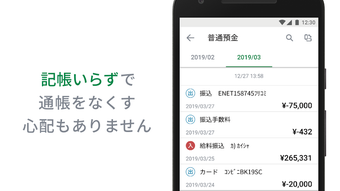
The user interface of 第四銀行 通帳アプリ is designed with simplicity and functionality in mind, offering a clean layout that prioritizes essential banking information. Navigation is structured around core functions such as balance overview, transaction history, and account settings, allowing users to quickly access needed data. The workflow is streamlined, enabling users to perform common tasks—like checking balances or viewing recent transactions—with minimal taps.
The app supports biometric authentication, which enhances the login process by reducing the need for repeated password entry. While specific performance metrics were not provided, the application’s lightweight size of 45.8 MB suggests efficient resource usage. The developer did not specify detailed resource consumption or CPU/RAM behavior.
Stability and responsiveness are expected to be consistent with standard mobile banking applications, though real-world performance may vary based on device capabilities and network conditions. The app is optimized for both Android and iOS platforms, ensuring a consistent experience across devices. Overall, the workflow supports efficient daily use, making it suitable for users seeking a fast and intuitive banking experience.
Compatibility & System Requirements
第四銀行 通帳アプリ is available for both Android and iOS operating systems. The current version is 2.4.0, with a file size of 45.8 MB. Users can download the app from the Google Play Store and Apple App Store.
The app requires a cash card issued by 第四銀行 and a registered Daiji ID to function. The developer did not specify exact system requirements, including minimum OS versions or hardware specifications. Compatibility information is limited to platform support.
It is recommended that users ensure their device meets standard requirements for running modern mobile applications. The app is designed to operate as a standalone digital banking tool and cannot be used alongside a physical passbook. Any transition back to a physical passbook must be completed in person at a bank branch.
For users considering installation, it is advised to verify device compatibility with the latest app updates through official app stores.
Pros and Cons
Pros
- Eliminates the need for physical passbooks, promoting digital convenience.
- Provides access to up to ten years of transaction history.
- Supports secure biometric login via fingerprint and face recognition.
- Integrates seamlessly with Daiji ID for identity verification.
- Lightweight size (45.8 MB) ensures efficient storage usage.
- Available for both Android and iOS users.
Cons
- Physical passbook access is permanently disabled upon app activation.
- Requires a cash card and Daiji ID registration for setup.
- No offline functionality mentioned.
- Reverting to a physical passbook requires an in-person branch visit.
- Exact system requirements were not specified.
FAQ Section
Is 第四銀行 通帳アプリ free to download and use?
Yes, the app is available at no cost. There are no subscription fees or hidden charges for using the core banking features.
Can I use the app without a physical passbook?
Yes, the app is designed as a digital-only alternative to the physical passbook. Once activated, the physical passbook becomes inaccessible.
What is a Daiji ID, and why is it required?
A Daiji ID is a registered identity used for secure authentication. It is required to verify user identity and link accounts within the app.
Is the app available on both Android and iOS?
Yes, 第四銀行 通帳アプリ is compatible with both Android and iOS devices and can be downloaded from the Google Play Store and Apple App Store.
Can I switch back to using a physical passbook after using the app?
No, switching back to a physical passbook is not possible through the app. Any reversal requires an in-person visit to a 第四銀行 branch.
Final Thoughts + CTA
第四銀行 通帳アプリ offers a modern, efficient solution for users seeking to digitize their banking experience. With its intuitive interface, secure authentication, and comprehensive transaction history, the app provides a practical alternative to traditional passbooks. Its focus on digital-only operations aligns with current trends in financial technology, promoting convenience, security, and sustainability.
While the permanent loss of physical passbook access is a notable limitation, it is balanced by the app’s robust features and seamless integration with Daiji ID. The application is ideal for tech-savvy users and those who prioritize mobile banking. For anyone looking to manage their finances digitally without paper clutter, this app delivers a reliable and secure experience.
Download 第四銀行 通帳アプリ now to take full control of your banking journey.





.png)

